
You have hardware or a prototype but no effective HMI
The device function and hardware platform are already defined, but the interface has not been designed yet or does not support the complete operating process.
HMI AND EMBEDDED UI
We design user interfaces and operator panels for device and machine manufacturers.
We join projects that already have hardware, a prototype or a working product but need a new HMI, a clearer existing interface or a better connection between the interface and the device logic.
We treat HMI as part of the system. It must reflect the process, device states, component status and the decisions available to the operator.
WHEN TO BRING US IN
The device function and hardware platform are already defined, but the interface has not been designed yet or does not support the complete operating process.
Screens were added over time, messages are ambiguous, and operators cannot clearly see the device state or the next action they should take.
The functions, display, operating model or system architecture are changing. You need an interface designed for the new device rather than a visual refresh of the old screens.
The process takes too many steps, key functions are hard to reach, or repeated operator errors point to problems in the interaction flow.
The interface needs to present states, parameters, interlocks, errors and available actions according to what is actually happening in the device.
We work with the client’s software and hardware teams, taking responsibility for interaction analysis, screen architecture, UI design and implementation-ready specifications.
DEVICES WE WORK WITH
HMI can be a standalone project scope or part of broader device software developed by Renau Digital.
Explore embedded software and hardware integrationHARDWARE → DEVICE LOGIC → HMI
An HMI is not a set of screens placed on top of a finished system. It is the layer through which a user or operator understands the device state and affects its operation.
This provides the basis for an interface that shows the real system state rather than only the expected user path.
HMI work does not include electronics design. We work within the context of an existing or developing device and agree how we will collaborate with the teams responsible for hardware and the other software layers.
STATES AND EXCEPTION SCENARIOS
A good HMI guides the user through the expected process, but it must also handle conditions in which the device cannot continue operating.
The operator can see what happened, understand the current device state and identify the actions available within the designed process.
SCOPE OF WORK
The scope depends on the stage of the project and the responsibilities of the client team. It can include:
If the project also includes HMI implementation or bringing it up on the device, we agree the technical scope and responsibilities separately. We do not assume that every project ends with design files only or that every client needs us to take over implementation.
WHAT THE CLIENT RECEIVES
The result is more than the visual layer. The client receives a coherent model of how the interface works, providing a shared reference for product, software and device teams.
An organised screen architecture, information hierarchy and functional structure aligned with how the device operates.
The main flows, system states, transitions, messages and exception scenarios.
Views and interface elements designed around the display, operating environment and way the device is used.
Agreed specifications and design assets that let the development team move from design to implementation without recreating the logic from visual mock-ups alone.
HOW WE WORK
01
We learn how the device works, who uses it, its operating environment, constraints and current project stage.
02
We define workflows, states, transitions, screen structure and the information operators need at each stage.
03
We design screens and components and check their consistency with device logic and operating conditions.
04
We document interface behaviour, messages and dependencies required for implementation.
05
We answer the technical team’s questions, refine scenarios and – when included in the agreed scope – support implementation and interface verification on the device.
HMI IN PRACTICE
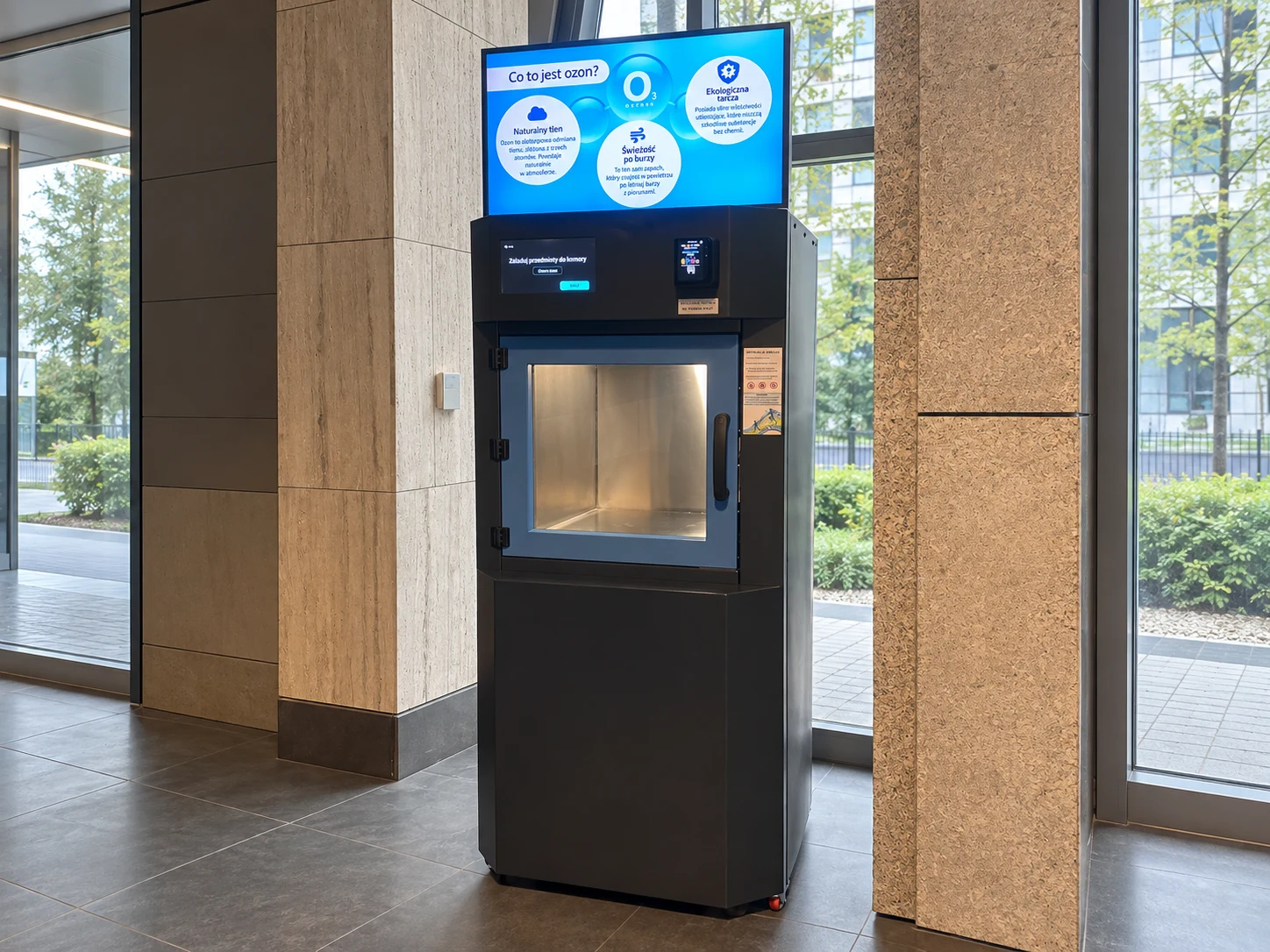
For an ozone treatment device, we developed software covering process control, component integration, a touchscreen interface and service views. The HMI guides users through program selection, chamber loading and the treatment cycle while showing device status and messages. The software was implemented and run on the physical device.
View the Trioxygene case study
We designed the interface architecture and operating logic for a foodservice device. The project organised program selection, parameter presentation and the active process stage to reduce the number of steps and the risk of operator errors.
View the operator panel project
We designed the UI/UX architecture for a vending system used in retail. The project covered product selection and transaction flows, payment and age-verification messages, and sales-process states and exceptions.
View the vending system projectFAQ
Yes. We can start by analysing the existing device, interface and system logic. We then determine whether the project needs a new HMI, selected workflows to be redesigned, or further development of the existing solution.
Yes. We collaborate with product, software and hardware teams. Together we agree device states, available data, how the interface communicates with the system and who is responsible for implementation.
No. The visual layer is one part of the work. The scope can also cover workflows, information architecture, device states, interaction logic, exception scenarios and specifications needed for implementation.
Yes, when implementation fits the agreed technical scope. We can also deliver a complete design and specification for the client’s development team and support them during implementation.
An initial description of the device, its development stage, main users and the support you need is enough to start. A prototype, current interface, process documentation or feature list helps us define the scope more quickly.
LET’S DISCUSS THE PROJECT
Describe the device, the project stage and the support you need. We will come back with an initial assessment of whether and how we can help.
Describe your projectThis website uses cookies and similar technologies to analyse traffic and protect the contact form from spam.
For more information, see our Privacy Policy.